
Manga on the same phone
Open your reader or browser, tap the floating button and choose screen translation. Android asks for permission to capture the content being translated.
MANGA · MANHWA · WEBTOON
Translate a reader app with the floating button, or a printed page with the camera. Read in your language without copying dialogue one line at a time.
Get it on Google Play ↗Free to download. Screen translation uses your plan quota; camera/images have separate plan access.
Getting started ↓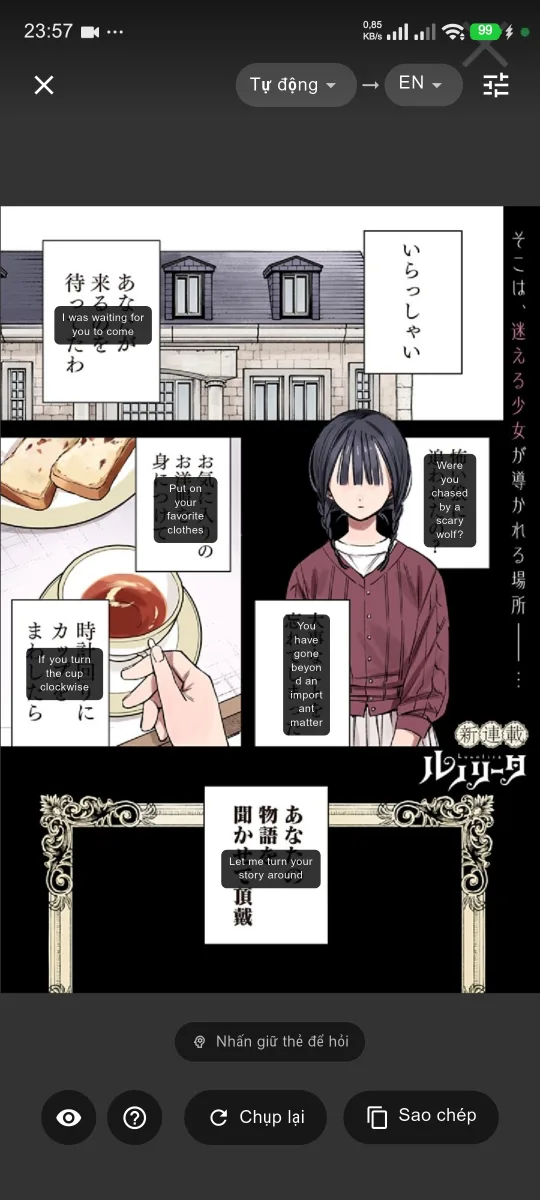
Getting started
Download TransKey for Android and follow the account setup in the app. Choose the language you want to read.
For a reader app, enable the floating button and approve the screen capture request. For a printed page, use camera translation and allow camera access.
Keep the dialogue visible, translate, then compare with the original. Zoom in or try a clearer image when small or stylized text is missed.
Open your reader or browser, tap the floating button and choose screen translation. Android asks for permission to capture the content being translated.
Use the camera for a physical page, or select an image in the app. Camera/image translation has its own plan access and is separate from screen translation.
Names, vertical text and sound effects can be difficult to recognize. Review the translation against the original; results depend on the image and language.
REAL CAMERA WALKTHROUGH
A TransKey camera recording. Press play to watch.
Video description: a Japanese manga page is recognized and English translations appear over the text. Auto Detect and EN show the selected languages.
Open the video directlyYes. Use the floating button and screen translation while your reader is open. You do not need to point a second device at the screen. Apps that block screen capture may not work.
The app is free to download. Screen translation is available on the Free plan within its quota. Camera/image translation has separate plan access. Check the current plan and remaining quota in the app before translating.
These languages are supported. Choose your target language in the app. Translation and text recognition can vary with the page layout, font and image quality.
No. Tiny lettering, overlapping artwork and stylized sound effects can be missed or translated incorrectly. Use a clear page and check important details yourself.
This guide covers the Android floating button. It does not promise an equivalent overlay on iOS; use the features available inside the iOS app instead.
Free to download. Screen translation uses your plan quota; camera/images have separate plan access.
Get it on Google Play ↗Android screen translation guide →See plans and limits