
Translate anything,
right where you are
TransKey lives inside your chats, comics, games and documents. Type, tap, or point your camera - the translation appears in place. No copying text, no switching apps.
or - no credit card or install needed
Free to start · 50+ languages · iOS · Android · macOS · Windows · v2.6.1
One app for every "I can't read this" moment
Wherever the foreign language shows up, TransKey translates it there.
Chat with anyone - the keyboard translates as you type
The TransKey keyboard works inside Messenger, WhatsApp, Telegram, LINE and every other chat app. Type in your language, tap Translate, and the message switches to theirs before you hit send.
- Their replies translate back into your language
- Reply suggestions ready to send with one tap
- Sell, work and make friends across languages
Translate the whole screen - even manga speech bubbles
Tap the floating TransKey button and the page you are looking at turns into your language, layout intact. Comics and manga get translated right inside the speech bubbles, so untranslated chapters finally read like released ones.
- Works on websites, apps and documents
- Manga: dialogue translated in place, not listed below
- One tap to show, one tap to dismiss
Point your camera at menus, signs and labels
Snap a menu, a street sign, a medicine label or a product box and read it instantly. Long-press any dish or phrase and AI explains what it actually is - context, not just words.
- Instant reading while you travel
- "What is this dish?" - real answers with context
- Great for imported products at home too
Play games that never got translated
On Mac and Windows, TransKey translates right on top of the game: dialogue, quests, item descriptions. Press the hotkey and the translation appears where the text is - or turn on live mode for long story scenes.
- Overlay translation, no alt-tabbing
- Live mode follows the dialogue as it changes
- Works with videos and streams too
Emails, reports and Slack - handled with one hotkey
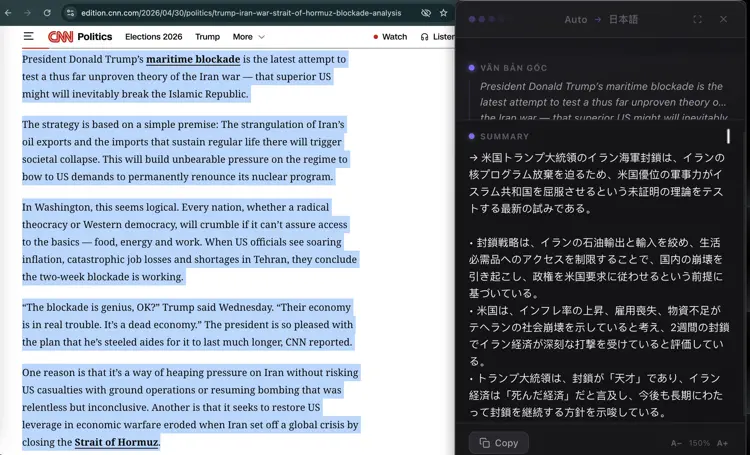
Highlight any text in any app and press one hotkey: translate it, summarize it, or draft a reply in the other side's language. The tone adapts to the app - casual in Slack, formal in email.
- Translate selected text in under a second
- Reply and Refine write it natural and professional
- Summarize long documents into key points
Check suspicious messages before anyone replies
Paste a message or screenshot and TransKey rates the scam risk in seconds - impersonation, urgency tricks, shady links. Install it for your parents; they are who scammers target first.
- Clear risk warning before you act
- Pro explains exactly what is off
- Works on screenshots of any chat
Why not just Google Translate?
Great for looking up a word. TransKey is for when you are in the middle of something.
It comes to you
No copy, switch, paste, switch back. The translation appears inside the app you are already using.
It gets the context
Tone adapts to where you are - casual in chats, formal in email - and slang or idioms translate by meaning, not word by word.
It speaks your terms
Pin your own glossary - product names, industry jargon - and they come out your way, every time.
It picks the best AI each time
Every request routes to the strongest model from GPT, Claude, Gemini and Llama for your language pair.
Three taps on mobile. One hotkey on desktop.
- 1Install free from the App Store or Google Play
- 2Enable the TransKey keyboard or floating button
- 3Translate right inside the app you are in
- 1Install for macOS or Windows
- 2Highlight text, press the hotkey
- 3Read or reply - without leaving the app
Simple, honest pricing
Start free. Upgrade when you need more.
- ✓20 translations / day
- ✓2,000 characters / day
- ✓10-entry glossary
- -Reply translate
- -Refine writing
- -Tone override
- -Summarize
- -Word explanation
- -Romanization
- -Voice (TTS)
- ✓Translate any screen
- -Camera translate (mobile)
No credit card required
- ✓Unlimited translations
- ✓Unlimited characters
- ✓500-entry glossary
- ✓Reply translate
- ✓Refine writing
- ✓Tone override
- ✓Summarize
- ✓Word explanation
- ✓Romanization
- ✓Voice (TTS)
- -Translate any screen
- -Camera translate (mobile)
- ✓Unlimited translations
- ✓Unlimited characters
- ✓500-entry glossary
- ✓Reply translate
- ✓Refine writing
- ✓Tone override
- ✓Summarize
- ✓Word explanation
- ✓Romanization
- ✓Voice (TTS)
- ✓Translate any screen
- ✓Camera translate (mobile)
Common questions
What languages are supported?
TransKey supports 50+ languages including Japanese, Chinese, Korean, German, French, Spanish, Portuguese, Arabic, and many more - any language the underlying AI models support.
How accurate are the translations?
Very accurate for everyday professional use - emails, Slack, reports, and documentation. The underlying models (GPT, Claude, Gemini, Llama) produce natural, context-aware output rather than word-for-word literal translations. For legal contracts or certified documents, always have a professional reviewer sign off.
How does the translate keyboard work?
TransKey installs as a keyboard on iOS and Android. Inside any chat app, type in your own language and tap the Translate key - the text switches to the other person's language before you send it. Incoming messages translate back the same way, without leaving the chat.
Can it really translate manga and comics?
Yes. Open the page in any reader app or website, tap the TransKey button, and the dialogue is translated right inside the speech bubbles with the page layout intact. It works for manga, manhwa, manhua and comics in 50+ languages.
What is the scam check?
Paste a suspicious message or share a screenshot to TransKey and it rates the scam risk in seconds. The Pro version also explains the red flags it found - impersonation, pressure tactics, dangerous links - so the warning is easy to trust and share with family.
Is it safe to use with confidential documents?
Your text is processed by the AI model and immediately discarded - nothing is stored or logged on our servers. We only track request counts for quota. That said, for highly sensitive documents subject to strict NDA or regulatory requirements, check your organization's policy on third-party AI tools.
What apps does it work in?
TransKey works in any app on macOS and Windows - Gmail, Outlook, Slack, Notion, VS Code, Chrome, PDF viewers, Word, and more. On iOS and Android, the keyboard and floating button work in any app that shows text. If you can see it, TransKey can translate it.
Do I need my own API key?
No. All AI costs are included in your plan. The free tier works immediately after sign-up - no API key, no credit card needed.
What platforms are supported?
TransKey runs on iOS 15 or later, Android 7 or later, macOS 13 Ventura or later (Intel and Apple Silicon), and Windows 10 or later (64-bit). All platforms are fully supported.
Can I cancel my subscription?
Yes, anytime. You can cancel directly from the app or the billing portal. Access continues until the end of your billing period.
Try it free for 7 days
Full Pro access - every model, every feature. No credit card. Cancel anytime in one click.
- No credit card required
- Cancel anytime
- Auto-downgrades to Free
Already have an account? · Just download the app